My Apple Photos library holds 61,497 items: 58,321 photos, 3,173 videos, and 697 favourites among them. A lot of them are accidental clicks, blurry shots, bursts of the same scene, and screenshots of things I no longer need. I wanted them gone without scrolling through the whole library by hand.
So I asked Claude to build a native macOS app for it. Photos Cleaner is a Swift app. It analyses everything on the Mac and never deletes anything on its own.
The constraint: the originals are not on the Mac
The library runs in Optimize Mac Storage mode. Only one original is on disk. The rest is 9.3 GB of smaller copies in 147,000 files; the full-size originals stay in iCloud.
That shaped everything. The app turns network access off for every image request, so it works only on the local copies and never pulls 60,000 originals down from iCloud. The app renders each photo once, at 512 pixels, and every detector reads that one bitmap. Decoding is the slow part, so it never happens twice.
What it looks for
- Exact duplicates. A difference hash (dHash) compares each pixel’s brightness with its neighbour’s. The first attempt hashed raw pixel values instead, and it broke whenever a JPEG was re-encoded. dHash survives re-encoding.
- Near-duplicates. Apple’s Vision framework gives each photo a feature print, a summary of what the picture shows. Two photos with a small distance between their prints show the same scene.
- Blur. A sharpness score, with the cutoff taken from this library’s own distribution, not a fixed constant. A photo counts as blurry only if it is soft and scores below the median on Vision’s aesthetics score. That rule protects portraits with a deliberately blurred background.
- Junk. Screenshots, receipts, and other utility images.
Calibration from real photos
I wanted a measured threshold for near-duplicates, not a guess. On real photos from the library, the same scene re-encoded, re-exposed, or panned gave distances of 0.04 to 0.59. The same scene reframed by a few percent gave 0.20 to 0.72, and fifteen pairs of different photos gave 0.81 to 1.10.
The default sits at 0.60. It catches every clear variant and leaves room below the lowest distance between distinct photos. A slider in the sidebar raises it for anyone who wants more matches.
The test harness had a lesson of its own. The first version used generated noise images, and it reported three failures. They were artefacts of the test data. Vision’s feature print describes what a picture shows, and noise shows nothing. The harness now runs on real photographs, with 34 checks.
Safety rails
- Favourites are never candidates, and they always win when the app picks which copy to keep.
- The app leaves hidden photos out entirely.
- Every group keeps at least one photo. An exhaustive test tries every order of keep and delete clicks on groups of two to six photos and confirms that no order can empty a group.
- Deletion happens in three reversible stages: a verdict in the app’s own database, then a staging album in Photos, then Photos’ Recently Deleted, which keeps things for 30 days. The app has no way to skip that last step.
The first scan
The first full scan processed 49,803 items and analysed 38,055. The other 11,748, about a quarter, had no local copy, so the app skipped them rather than download them.
It found 168 exact duplicates, 20,522 near-duplicates, 527 blurry photos, and 3,460 junk and utility images.
What the review screen taught me
The first review screen was broken. Tiles spilled out of the pane and captions sat on top of the photos. The cause was one SwiftUI modifier that made each tile fill more space than it was given. Square crops also hurt the task: you cannot compare two framings if both are cropped to squares.
The replacement layout tries every column count and picks the one that gives each photo the most area. Photos always fit and are never cropped. A second harness checks it across window sizes, aspect ratios, and group sizes from 2 to 30: 285 checks.
Two more fixes came from using it:
- Marked photos used to be tinted. That made a marked photo look like a worse photo, which corrupts the very comparison the app exists for. Now only the border and a KEEP or DELETE badge show the state.
- The app shortens filenames under each tile in the middle, not at the end. Near-identical shots differ at the tail (IMG_4431 against IMG_4432), and the tail is what you need to see.
A keystroke opens any photo in Photos itself, and marking a photo adds it to the staging album as I go.
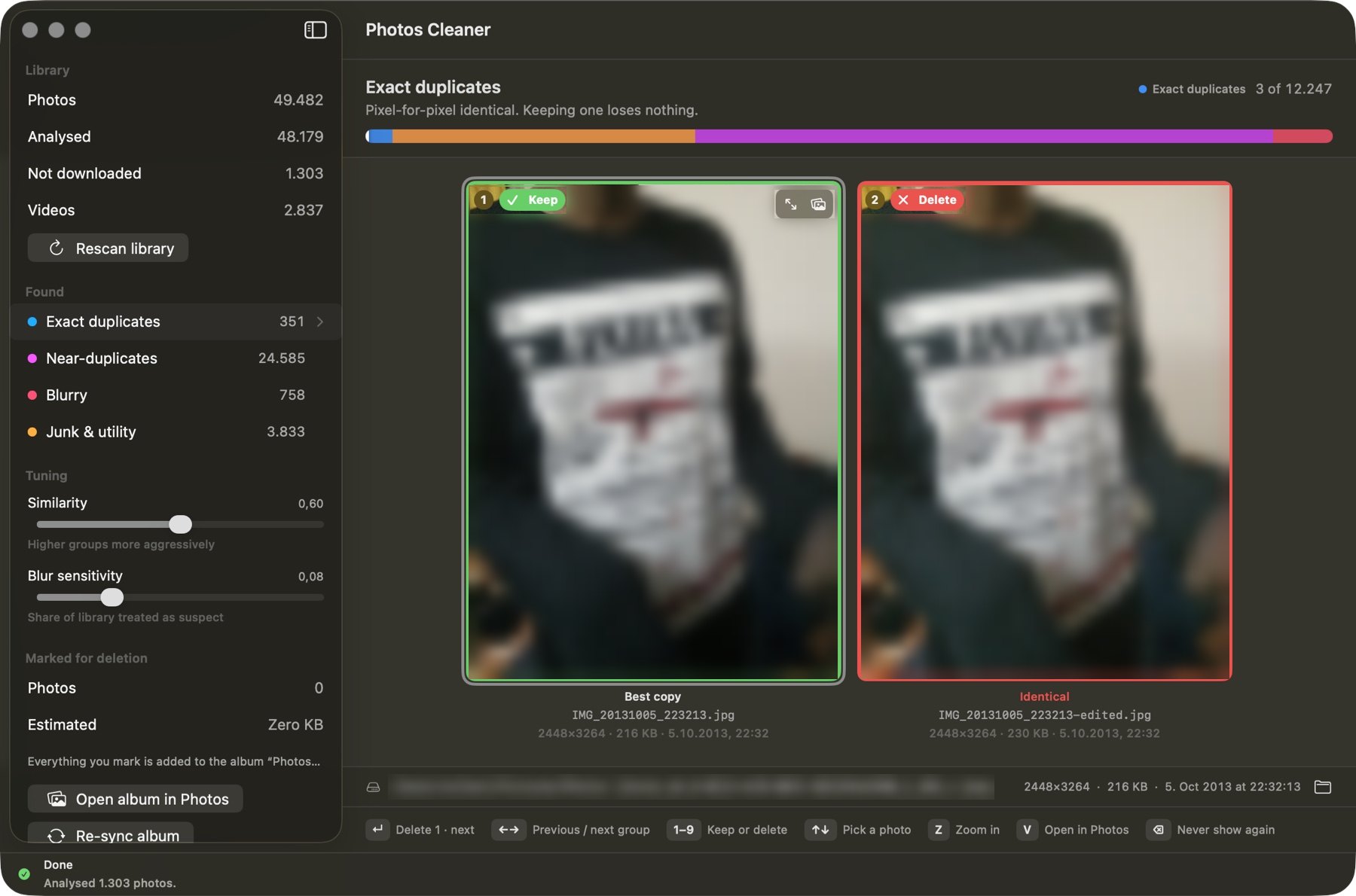 The review screen on an exact duplicate. I pixelated the photos for this post. The counts come from a later scan than the one above.
The AI part
I did not write the Swift. I described the problem, the constraint, and the rules, and Claude wrote the app, the Xcode project file, the detectors, and both test harnesses. My job was to say what was wrong when I used it: spinners that never stopped, a sidebar count that made no sense, and a keeper I could still delete. Each of those became a fix and, where it could, a test.